 Untouched
Keep the videos you love ready to play.
Optimize iPhone Storage can free up 100 GB by keeping your library in iCloud. The catch: older videos have to download before they play, and a long one can take minutes, or not load at all. Untouched keeps the originals of the few you choose on your iPhone, so they play instantly, even offline.

Keep one item free. More from $3.99/month. For iPhone, iOS 26 or later.

More space. Then the videos won’t play.
If this sounds familiar, Untouched was made for you.
-
150 GBof photosiPhone245 GB of 256 GB used
- Photos 150 GB
- Apps
- System
Your iPhone is full
256 GB, and photos and videos take 150 GB of it. You’ve never used iCloud.
-
145 GBfreediPhone100 GB of 256 GB used
- Photos 5 GB
- Apps
- System
iCloud frees up the space
You turn on iCloud Photos with Optimize iPhone Storage. The originals move to iCloud and your library on the iPhone shrinks to a few gigabytes.
-
 Loading video…
Then the videos won’t play
Photos come back in a second when you tap them. Long videos have to download first: minutes on a slow connection, nothing offline, sometimes “Unable to Load Video”.
Optimize iPhone Storage covers your whole library. There’s no setting that says “keep this one video on my iPhone.” That one thing is what Untouched does, and you keep the 145 GB.
The video stays on your iPhone, exactly as you shot it
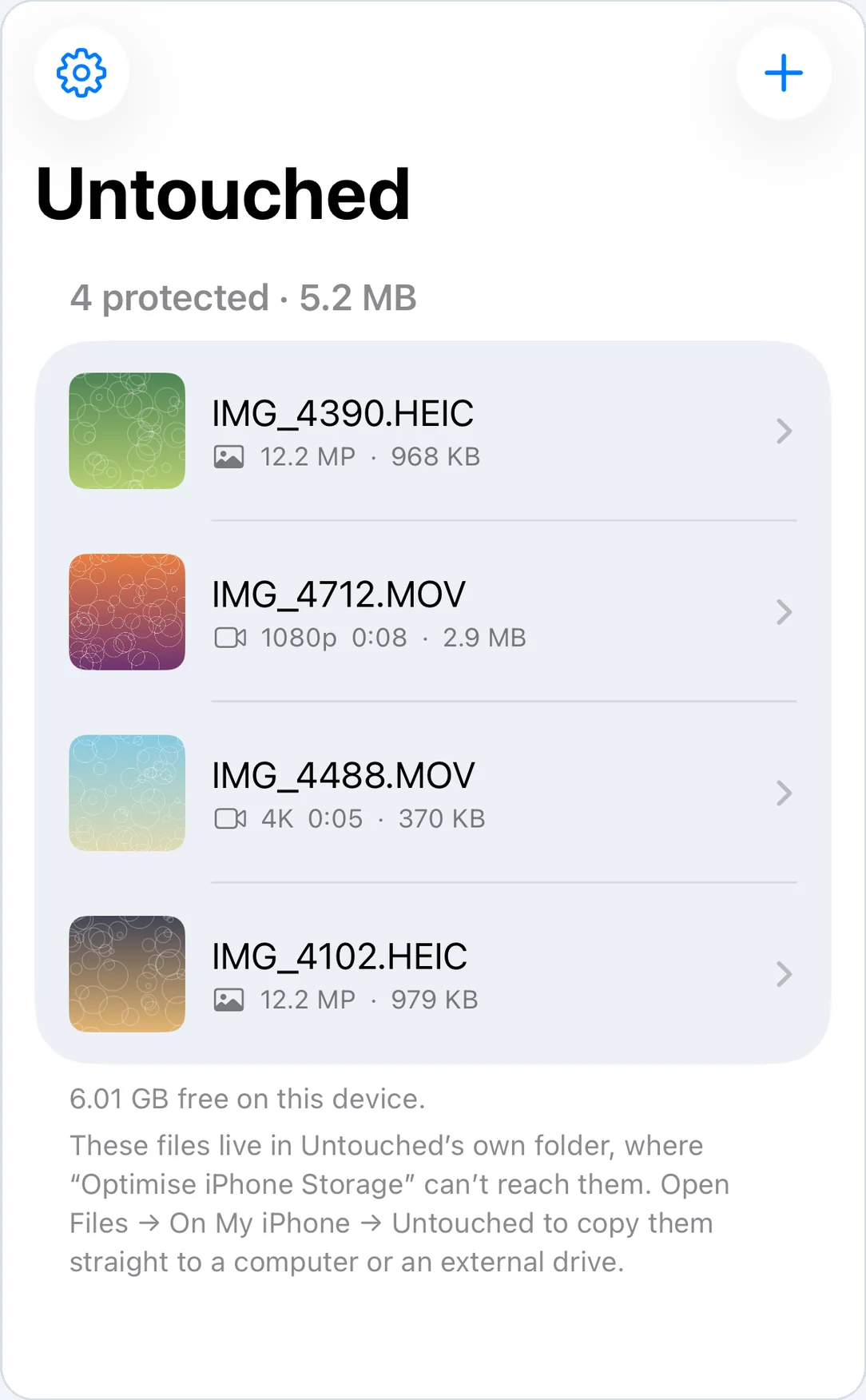
Untouched copies the original file Photos keeps for the item into its own folder. That copy isn’t part of your optimized library, so it never gets swapped for a smaller version and never has to wait for a download.
- Playback
- Instant, even offlineIt’s a file on your iPhone, not a download waiting to happen. Play it in Untouched or the Files app.
- Quality
- Byte for byteThe original the camera wrote: not an export, not a re-encode. 4K HEVC stays 4K HEVC.
- Metadata
- Still inside the fileCapture date, camera details and location travel with the original.
- Live Photos
- The photo and its videoBoth halves are kept together.
- Edited items
- Before and afterThe unedited original, the edited version and the edit data.
- Checksum
- SHA-256 for every fileRecorded when it goes in. Tap Verify integrity any time to confirm nothing changed.
- Where
- Files › On My iPhone › UntouchedOne readable folder per item. Copy it to a Mac or a drive; it opens without the app.
- Your library
- Left aloneUntouched only reads. It never edits, moves or deletes anything in Photos, and your library stays optimized.
- Uploads
- NoneNo account, no server. Your videos never leave your iPhone.
This is what you get when you choose from Photos. Files you bring in from the Files app are kept exactly as they are, one file each.
How it works
Pick the videos you rewatch
Tap +, then Choose from Photos. The first steps, the wedding, the concert, the last video of someone you miss. Photos work too.
Untouched brings the original home, once
If the video is only in iCloud, Untouched downloads the full original one time and keeps it. You see the real amount retrieved and the speed. Keep the app open until it’s done.
Play it any time
Open it in Untouched, or in Files › On My iPhone › Untouched. No waiting and no connection needed.
Keep one free. Pay only to keep more.
Try it with one video, for as long as you like. To keep more, subscribe or buy once.
What you’ve kept stays yours. If you stop paying, nothing is locked, hidden or downgraded; you just can’t add more. The files are ordinary folders you can copy out any time.
US prices. The App Store shows the price for your country. Subscriptions renew automatically until you cancel them in Settings.
What to know before you start
Untouched does one job. Here’s exactly where its edges are.
- Play the kept copy from Untouched. The Photos app keeps showing its optimized version, as before. The copy that plays instantly lives in Untouched and in Files.
- It uses space for what you keep. A long 4K video can be several gigabytes. Keep the ones you rewatch; the rest of your library stays slim.
- Deleting the app deletes its folder. iOS removes an app’s files when you delete it. Copy them out first.
- A copy isn’t a backup. It’s left out of your iPhone backup by default because the original is already in your library. For a second copy, drag the Untouched folder to a computer or drive now and then.
Questions
Why do my videos take so long to play, or say “Unable to Load Video”?
With Optimize iPhone Storage on, the full video is in iCloud and your iPhone keeps a smaller version. When you play it, Photos downloads the original first. A long video can take minutes on a slow connection, won’t play offline, and sometimes fails with “Unable to Load Video”. Why this happens and what fixes it.
Can I keep one video on my iPhone without turning off Optimize Storage?
Not inside the Photos app: the setting applies to your whole library. That’s exactly what Untouched is for. Pick the video, and Untouched keeps its original file on your iPhone while the rest of your library stays optimized.
Will the video then play instantly in the Photos app?
No. Photos keeps showing its optimized version, just as before. Play the kept copy in Untouched or in Files › On My iPhone › Untouched, where it opens instantly, even offline.
How is this different from “Download and Keep Originals”?
That setting brings every original back onto your iPhone. If your library is 150 GB and your phone was already full, it simply won’t fit. Untouched keeps only the videos and photos you choose, so you keep the space you freed. Compare the two settings.
Does Untouched compress or convert my videos?
No. It copies the original files Photos keeps for each item, byte for byte, and records a SHA-256 checksum for every file so you can verify them later.
How much space does it use?
Exactly the size of what you keep. A few favorite videos might be a few gigabytes, far less than bringing back your whole library.
Does it upload my videos anywhere?
No. There’s no account and no server; your files stay on your iPhone. The app sends anonymous usage statistics, such as whether a copy succeeded and how large it was, and never file names, locations or images. Read the privacy policy.
Why does it need access to all my photos?
The photo picker only tells an app which library item you chose when the app has full access, and that’s the only way to reach the item’s original files. Untouched only reads. It never changes or deletes anything in your library.
Can I keep items from the Hidden album?
Yes. If the Hidden album is locked with Face ID, iOS doesn’t give apps the full item, so Untouched keeps the single file the system hands over. The app marks it “Picker copy”, and it may not be the original. For the complete original, turn off the lock in Settings › Apps › Photos while you add it, then turn it back on.
What happens if I stop paying?
Nothing you’ve kept is touched. You can still play, verify, export and delete everything. You just can’t add new items beyond the free one.
What happens if I delete the app?
iOS deletes the app’s folder along with it, including everything kept in Untouched. Before deleting the app, copy the folder to another place in Files, to a computer or to a drive.
Does it keep new videos automatically?
No. You choose what to keep, and copying runs while the app is open.
Which devices and languages does it support?
iPhone with iOS 26 or later. The app is available in English and Simplified Chinese.
How do I restore a purchase on another iPhone?
Open the upgrade screen and tap Restore. Make sure both iPhones are signed in with the same Apple Account.
Guides
Straight answers about videos and photos with Optimize iPhone Storage, whether or not you use Untouched.
iPhone videos won’t play or take forever to load from iCloud?
Why it happens, the “Unable to Load Video” error, and the fixes that fit a full phone.
How to keep specific videos on your iPhone with Optimize Storage on
There’s no per-video switch. Here are the ways around it.
Optimize iPhone Storage vs. Download and Keep Originals
What each setting keeps where, and which one fits your phone.
Why do old photos and videos look blurry on my iPhone?
The usual cause, how to tell, and what fixes it.
How to copy original videos and photos off your iPhone without losing quality
The transfer methods that keep the original file, and the ones that don’t.
Ways to keep full-quality videos on an iPhone, compared
Built-in settings, manual exports, a drive, and Untouched side by side.
Pick the videos you rewatch. Keep them ready to play.